


RPO Pregnancy Preferences Mod
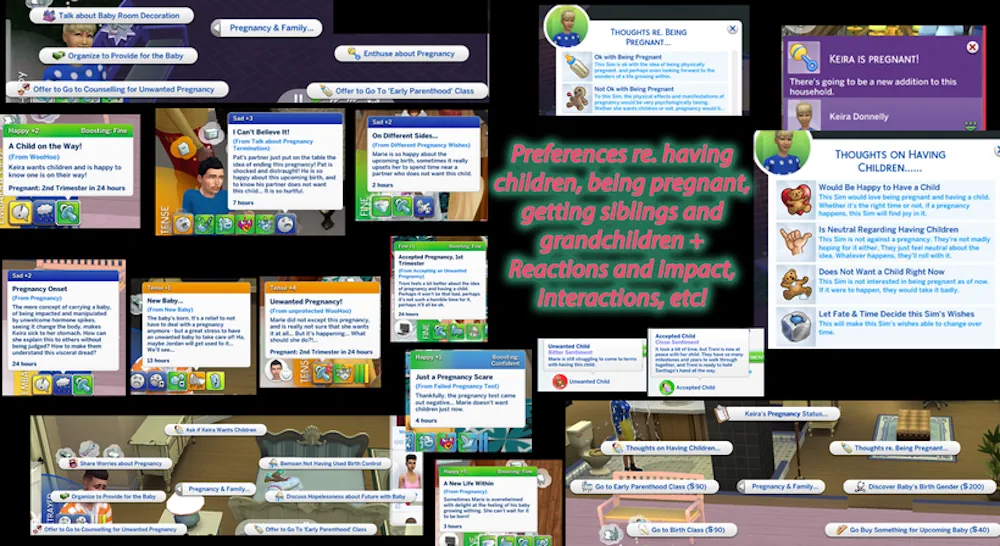
Add deeper family drama to your Sims with the RPO Pregnancy Preferences Mod. This module is part of the Relationship & Pregnancy Overhaul collection, and it focuses on how Sims feel about pregnancy, family plans, and big life changes. Instead of every Sim reacting in the same simple way, this mod gives them more personal feelings. Some Sims may be happy about a pregnancy, while others may feel worried, unsure, upset, or simply not ready. It makes family stories feel more real, especially if you like playing with relationships, couples, drama, and life choices.
Pregnancy Feels More Personal
The main idea of this mod is simple: pregnancy should not feel the same for every Sim. With this module, Sims can have different preferences and reactions connected to pregnancy and family life. This can change the mood of your story a lot. A couple may not always agree. One Sim may dream about having a child, while another may not want that step yet. That small difference can create much better storytelling. It is useful for legacy saves, realistic families, drama-based gameplay, or long-term Sims stories where emotions matter.
Why This Mod Works Well
This is not a huge visual mod, but it adds something important in the background. It gives more meaning to pregnancy moments and family decisions. You may like it if you want: More realistic pregnancy reactions Family stories with stronger emotions Sims who do not all feel the same Better drama between partners More depth for RPO gameplay It is also a good choice if you already use other RPO modules, because this one helps build the emotional side of pregnancy and family planning.
Important Note
This mod needs the RPO Core Library to work correctly. Make sure you have the core file installed before using this module. The creator also says there are no known conflicts, but it is still smart to remove old versions before adding the new file. Put the package file into your Mods folder or one subfolder only.
Available Files
Need help? Read our Sims 4 mod installation guide.
How to Install Sims 4 Mods & CC
- Download the file.
- Unzip the archive if needed.
- Move .package or .ts4script files to Documents/Electronic Arts/The Sims 4/Mods.
- Enable Custom Content and Script Mods in the game settings.
- Restart the game.
Comments