



Must Have Sims 4 Mods 2026: Script Mods & Utilities
Some mods are worth installing before anything else. These must have Sims 4 mods do not add flashy content. They give you control, fix small annoyances, speed up building and CAS, and keep the rest of your Mods folder working. We chose tools that are maintained for current patches and useful in almost any save. Most are script mods, so turn on Script Mods in the game options first.
Quick picks:
- Control your save: MC Command Center
- Cheats without typing: UI Cheats Extension
- Required by many mods: XML Injector
- Find broken mods: Better Exceptions
- For builders: Better BuildBuy and T.O.O.L.
- Small comfort fixes: Always Testing, Interactions Queue Extender, Quick Save Button, More Columns in CAS
1. MC Command Center

MCCC is the control panel most players install first. It manages story progression, pregnancy chances, townie and NPC households, careers, population limits, outfits and much more, all from a menu on the in-game computer.
It is modular, so you can skip the parts you do not need, and nearly every setting is optional. Use it to set long-term rules for your world while UI Cheats handles quick one-off changes.
Needs: Script mods enabled. Use the version that matches your game patch.
Original mod page (CurseForge)
2. UI Cheats Extension

weerbesu's UI Cheats Extension turns the interface into a cheat menu. Left-click a need bar to set it, right-click money, skills, careers, relationships, moodlets, aspirations or the clock to change them instantly.
It covers newer systems too, like Dynasty prestige, luck and Noble Favor. It conflicts only with other UI mods that override the same panels.
Needs: Version-locked: install the release built for your current game version.
3. XML Injector

XML Injector adds nothing on its own, but a huge number of mods need it to add interactions to Sims, objects and phones. Many popular picks on this site, from Ultrasound Scan to Live In Services, will not work without it.
If menu options from a mod are missing, an outdated or missing XML Injector is one of the first things to check. Keep a single, current copy in your Mods folder.
Needs: Nothing. It is the library.
Original mod page (CurseForge)
4. Better Exceptions
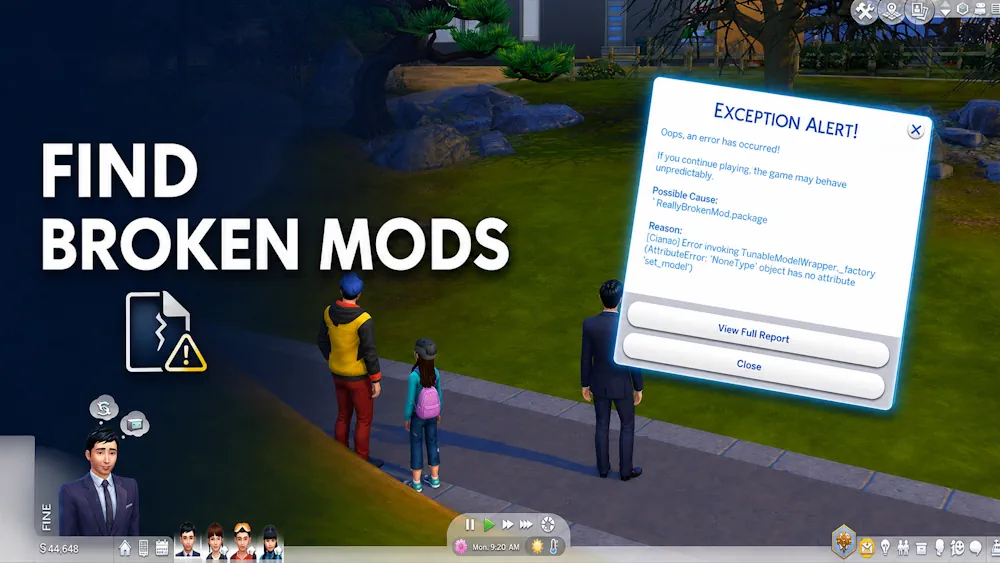
TwistedMexi's Better Exceptions reads lastException errors and creates a clear report that points to the files most likely to blame, with their location in your Mods folder.
It does not fix broken mods, but it saves hours of removing files half by half to find the culprit. Essential for anyone with a large Mods folder.
Needs: Script mods enabled.
Original mod page (CurseForge)
5. Better BuildBuy

Better BuildBuy sorts debug and Live Edit objects into a clean Organized Debug catalog, adds better filters and an expandable catalog, and makes hidden objects easy to browse.
It also adds a Build Mode camera and integrates with T.O.O.L. for precise placement. Big decorating projects get noticeably faster.
Needs: Script mods enabled. Put the tmex-BetterBuildBuy folder directly in Mods.
Original mod page (CurseForge)
6. T.O.O.L.

T.O.O.L. (Takes Objects Off Lot) removes placement limits. You can move objects to exact coordinates, off the lot or into the world, set any height, tilt them on any axis and resize them far beyond the normal range.
Builders use it to create custom structures from everyday objects. It works in Live Mode on its own, and Better BuildBuy adds a Build Mode version.
Needs: No other mods required. Better BuildBuy for the Build Mode integration.
Original mod page (CurseForge)
7. Always Testing

TwistedMexi's Always Testing keeps testingcheats on permanently, so Shift-click options are always there after travel, CAS or switching households.
It is a single script with no menu or settings. Drop it in and forget about it. It does not unlock cheats that the game blocks, it only keeps the usual testingcheats options available.
Needs: Script mods enabled.
Original mod page (creator's site)
8. Interactions Queue Extender

TURBODRIVER's Interactions Queue Extender raises the action queue for playable Sims from 6 to 16, so you can plan long chains of tasks without the queue clearing itself.
NPCs and pets keep the default limit, which keeps the game from slowing down. It does not override tuning, so conflicts are rare.
Needs: Script mods enabled.
Original mod page (CurseForge)
9. Quick Save Button

SimMattically's Quick Save Button puts a save button right on the Live Mode screen, so saving takes one click.
Right-click it to get reminders every 10, 20, 30, 40, 50 or 60 minutes, or turn reminders off. It is a small habit-saver for long legacy sessions, building and mod testing, especially right before you switch households or try something risky.
Needs: Base game UI mod.
Original mod page (creator's site)
10. More Columns in CAS

weerbesu's More Columns in CAS widens the Create a Sim catalog to 3, 4, 5 or 6 columns, so large CC collections are much quicker to browse.
Pick only one column file. Higher counts need a higher resolution or a smaller UI scale, and a Legacy Edition version is available.
Needs: Version-locked to the game patch.
How to Choose
Every save benefits from MC Command Center, XML Injector and Better Exceptions. Builders should add Better BuildBuy and T.O.O.L., while CAS fans will love More Columns in CAS. Always Testing, Interactions Queue Extender and Quick Save Button are tiny comfort tools you can add at any time.
Install Order and Tips
Install libraries first (XML Injector, plus Lot 51 Core Library if another mod asks for it), then MCCC and Better Exceptions, then the rest. Delete the old version before you add an update, never keep two copies of the same mod, and clear localthumbcache.package in your Sims 4 folder after big changes. After every game patch, play without mods for a moment or check each creator page before loading an important save, because UI and script mods are the first to break.
If the game shows a lastException or a menu stops opening, let Better Exceptions scan the error. It usually points to an outdated file within seconds, which is much faster than testing your whole folder.
FAQ
Do I need every mod on this list?
No. XML Injector is only needed when another mod requires it, and builder tools are optional if you never use Build Mode. MCCC and Better Exceptions are the two we would keep in almost any setup.
Why do my script mods stop working after a patch?
Game updates often break script and UI mods. Check each creator's page for an updated version, and remember that UI Cheats Extension and More Columns in CAS are built for one specific game version.
How deep can I put these files in my Mods folder?
Script files (.ts4script) must be no more than one subfolder deep inside Mods, or the game will not load them.
Comments