
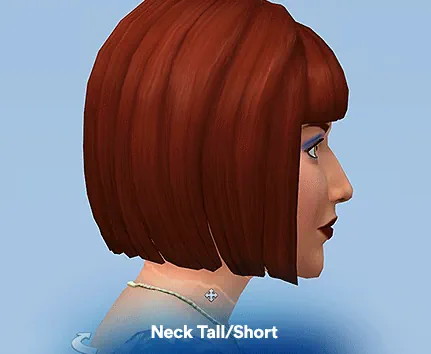

Neck Height Slider
Neck Height Slider is a small but useful CAS mod for players who like more control over Sim proportions. Instead of leaving every Sim with the same neck shape, this slider lets you adjust the neck height manually.
It is a simple detail, but it can make faces and body shapes look more natural, elegant, or unique.
How It Works
To use the slider, open your Sim in CAS and switch to profile view. Then drag the neck up or down to change the height.
The mod can also be used with Luumia's Height Slider, which is nice if you want more realistic body variety. Just keep in mind that Sims with very different neck heights may have some clipping during certain poses or interactions.
Available Files
LUUMIA_mod_NeckHeightSlider_UpdateJune2022.package
Downloads: 1
-
1.05 Kb
Need help? Read our Sims 4 mod installation guide.
How to Install Sims 4 Mods & CC
- Download the file.
- Unzip the archive if needed.
- Move .package or .ts4script files to Documents/Electronic Arts/The Sims 4/Mods.
- Enable Custom Content and Script Mods in the game settings.
- Restart the game.
If this is a script mod, it usually must not be placed deeper than one folder inside the Mods directory.
Comments