
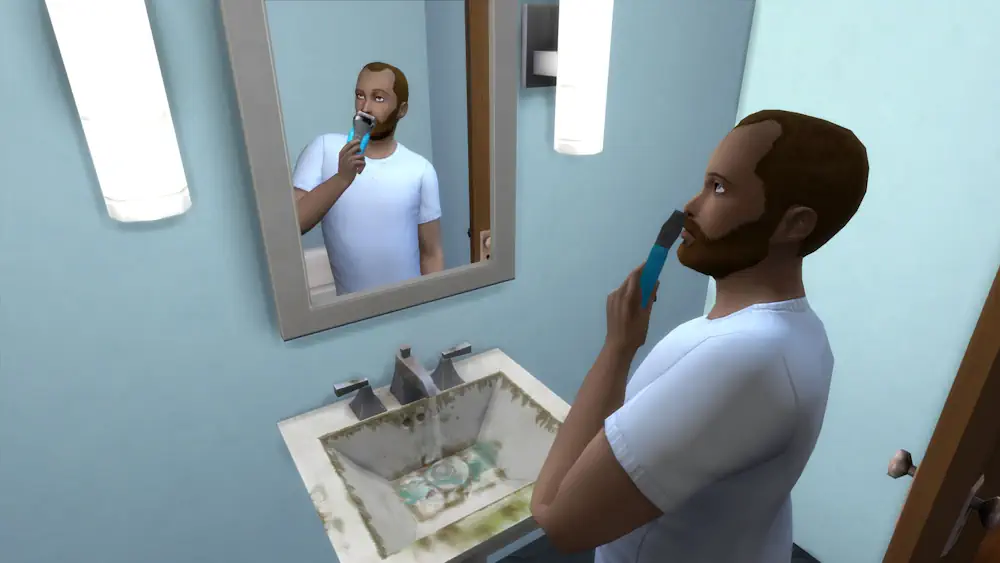


Automatic Beards Mod
Some Sims look finished the moment you leave CAS, but real life does not stay that clean. Automatic Beards Mod adds a small daily detail that makes male Sims feel more changeable: their facial hair can grow, be trimmed, shaved, and managed over time.
After choosing a beard color at a sink, beard growth starts during normal gameplay. Your Sim can keep it neat, let it grow out, or remove it completely when the look no longer fits.
Shaving Becomes Part of the Routine
This mod is not only about adding more beard styles. It turns facial hair into a light gameplay system. Sinks can become dirty after shaving, hair clumps may appear, and Sims can even get small shaving cuts. If hygiene is low, stubble can also feel uncomfortable until your Sim takes care of it.
There is also a Beard Growth Tonic that can be ordered from the computer, plus optional growth speed files for different lifespan settings. Elder Sims get their own touch too, with grey or white facial hair and a longer wizard-style beard stage.
Automatic Beards V4.5 works for male young adult, adult, and elder Sims. The mod is base game compatible, but it requires Scumbumbo's XML Injector V3 to work correctly.
Available Files
Need help? Read our Sims 4 mod installation guide.
How to Install Sims 4 Mods & CC
- Download the file.
- Unzip the archive if needed.
- Move .package or .ts4script files to Documents/Electronic Arts/The Sims 4/Mods.
- Enable Custom Content and Script Mods in the game settings.
- Restart the game.


Comments