
![Safer Pregnancy Choices [RPO 2] image](/uploads/posts/2026-05/fertility-and-protection-mod.webp)
![Safer Pregnancy Choices [RPO 2] screenshot 1](/uploads/posts/2026-05/pregnancy-mod-sims.webp)
![Safer Pregnancy Choices [RPO 2] screenshot 2](/uploads/posts/2026-05/fertility-and-protection.webp)
![Safer Pregnancy Choices [RPO 2] screenshot 3](/uploads/posts/2026-05/birth-control.webp)
Safer Pregnancy Choices [RPO 2]
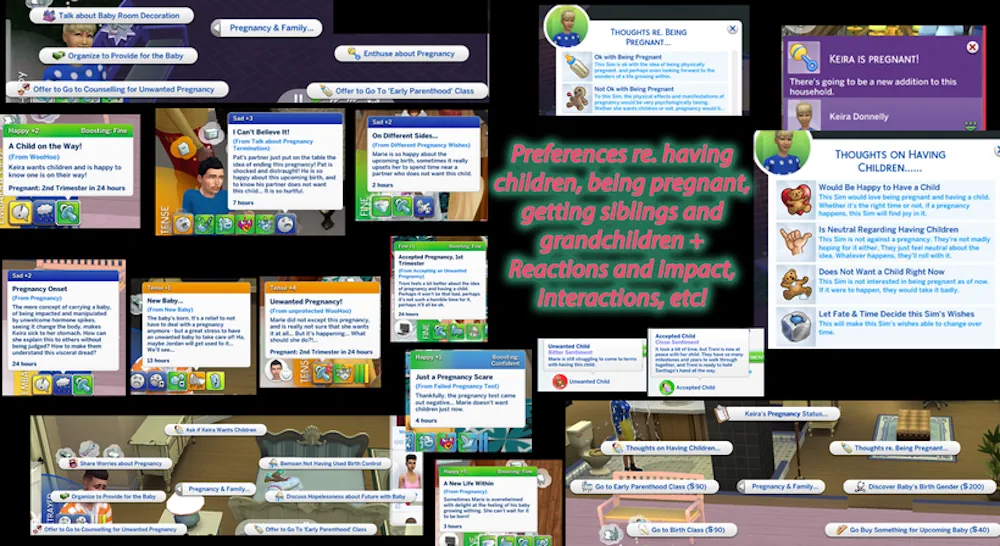
Sims 4 Fertility and Protection Mod gives your Sims more control over pregnancy risk, birth control, and family planning. It is part of the RPO collection and works like a deeper system for players who want romance and pregnancy to feel less simple.
With this mod, pregnancy is not only about pressing one interaction and waiting for the result. Your Sims can have different fertility chances, use protection, and deal with more realistic outcomes around trying for a baby. It fits best if you like family gameplay, relationship drama, or long save files where every choice should feel a bit more important.
More Control Over Pregnancy Risk
The main idea of this mod is simple: pregnancy can happen with more realistic chances, and your Sims can protect themselves if they are not ready for a baby. This makes romance gameplay feel more alive. Some Sims may be careful, some may take risks, and some stories can turn into surprises. It is useful for both serious family saves and messy drama saves. You can use it for:
- more realistic pregnancy chances
- protection and birth control style gameplay
- family planning stories
- relationship drama saves
- players who already use RPO mods
Good for Realistic Family Saves
This mod is not just a small visual change. It adds more meaning to relationships and pregnancy choices. If you want your Sims to plan families, avoid pregnancy, or have more natural story moments, this mod can make those parts feel much better. It also works as a nice piece of the full RPO setup, especially if you already use other relationship and pregnancy mods from the same collection. Before using it, make sure you have the required RPO Core Library installed. Also, if you use other pregnancy or romance mods, check your settings so different pregnancy systems do not fight with each other.
Available Files
Need help? Read our Sims 4 mod installation guide.
How to Install Sims 4 Mods & CC
- Download the file.
- Unzip the archive if needed.
- Move .package or .ts4script files to Documents/Electronic Arts/The Sims 4/Mods.
- Enable Custom Content and Script Mods in the game settings.
- Restart the game.
Comments