
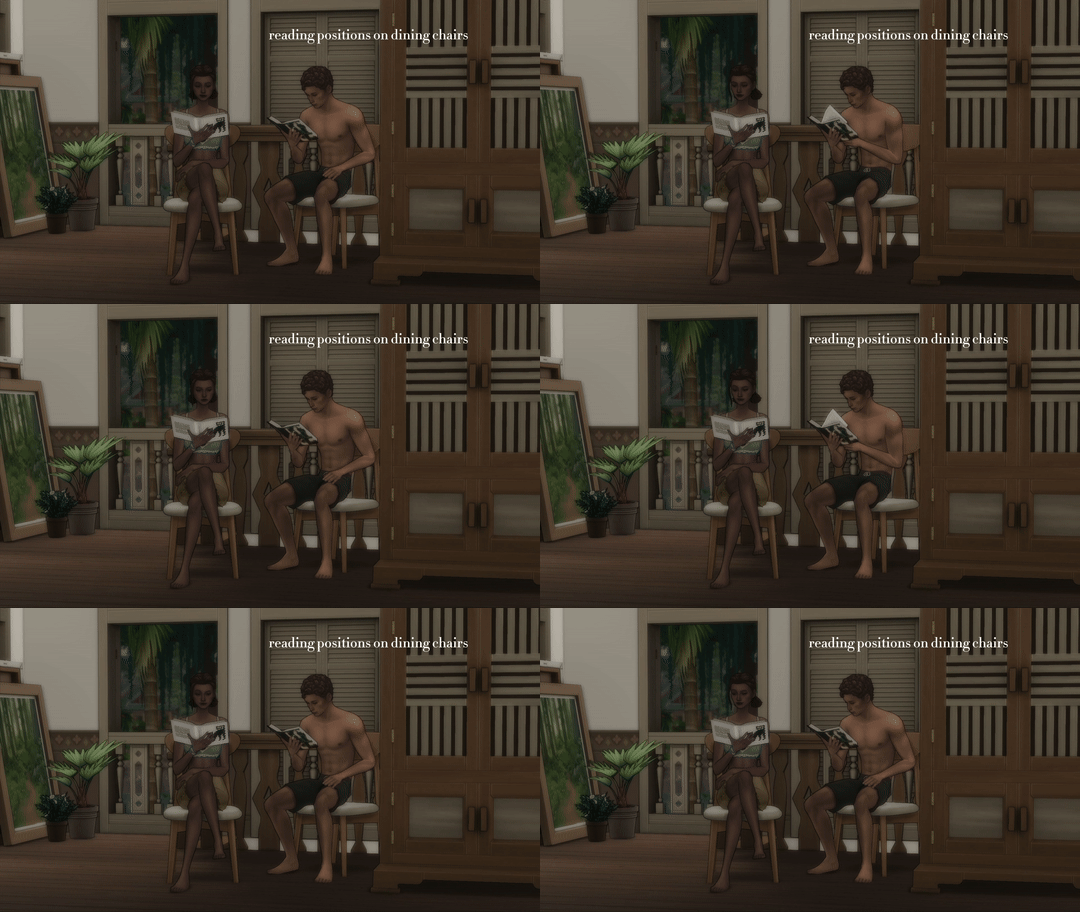


Reading Animation Override 2.0
Reading Animation Override 2.0 by Simkatu gives book moments a softer and more natural look. Instead of the usual stiff sitting pose, Sims can now read with different body positions depending on where they are sitting.
The standard version includes 8 reading poses. These cover common places like dining chairs, sofas, beds, tables, and living chairs. In the standard file, living chair poses use the same animation style as sofas, while the extended supporter version adds extra living chair poses.
This update is also important because it fixes problems from older reading overrides. Sims should no longer sink into bar stools, and rocking chair reading now plays with a normal animation. Kids reading was also fixed in a later update, so it is better to download the newest file.
The mod does not add a new reading system or new books. It simply replaces the visual animation, which makes it perfect for cozy homes, bookworm Sims, screenshots, storytelling, and calm everyday gameplay.
There is also an optional Life & Death fix file for players who own that expansion. It fixes the start and end animation for the Write Goal interaction.
Use this override if you want reading scenes to look less robotic without changing the main gameplay.
Available Files
Need help? Read our Sims 4 mod installation guide.
How to Install Sims 4 Mods & CC
- Download the file.
- Unzip the archive if needed.
- Move .package or .ts4script files to Documents/Electronic Arts/The Sims 4/Mods.
- Enable Custom Content and Script Mods in the game settings.
- Restart the game.
Comments