
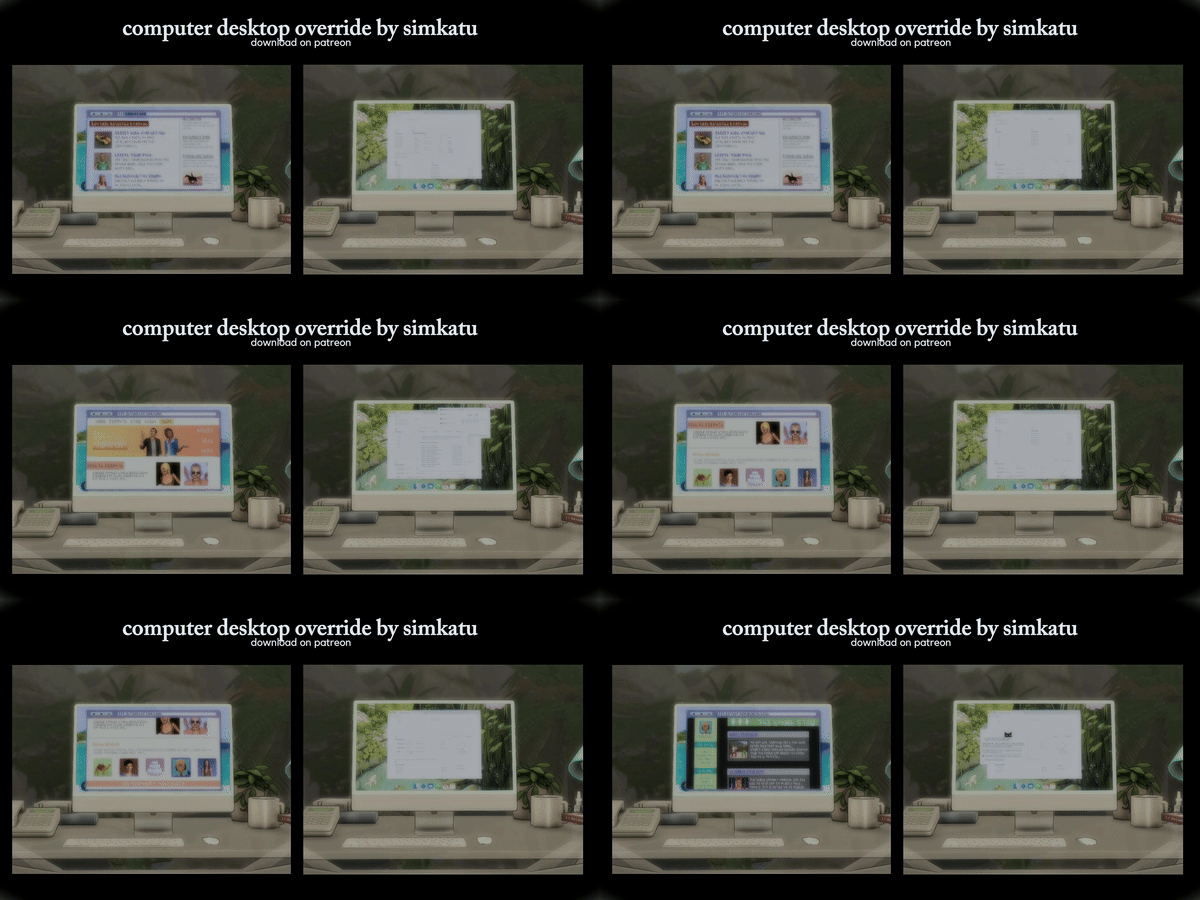

Computer Desktop Override
A small screen detail can change how a whole room feels. This Computer Desktop Override updates the look of Sims computer screens, making them fit better in modern bedrooms, offices, study corners, and streamer-style setups.
The mod changes the desktop visuals used during many regular computer interactions. So when your Sim is writing, browsing, chatting, or using the computer for everyday tasks, the screen no longer has that older default look.
It is made for players who care about visuals but do not want a heavy mod. There are no new computer menus, no extra systems, and no gameplay rules to learn. It simply improves what you already see in normal play.
One useful detail: game screens are not replaced. That means you can still use separate video game screen overrides without this mod fighting with them.
You may also notice updated visuals for lifestyle and funny video screens. These little changes help the computer feel more like part of a real setup, not just a basic EA object.
Good for:
modern houses, office rooms, teen bedrooms, content creator Sims, screenshots, everyday realistic saves
The creator mentions that screen glare can appear in some cases. If the screen looks too bright, lighting or graphics settings may affect how it appears in-game.
Available Files
Need help? Read our Sims 4 mod installation guide.
How to Install Sims 4 Mods & CC
- Download the file.
- Unzip the archive if needed.
- Move .package or .ts4script files to Documents/Electronic Arts/The Sims 4/Mods.
- Enable Custom Content and Script Mods in the game settings.
- Restart the game.



Comments