
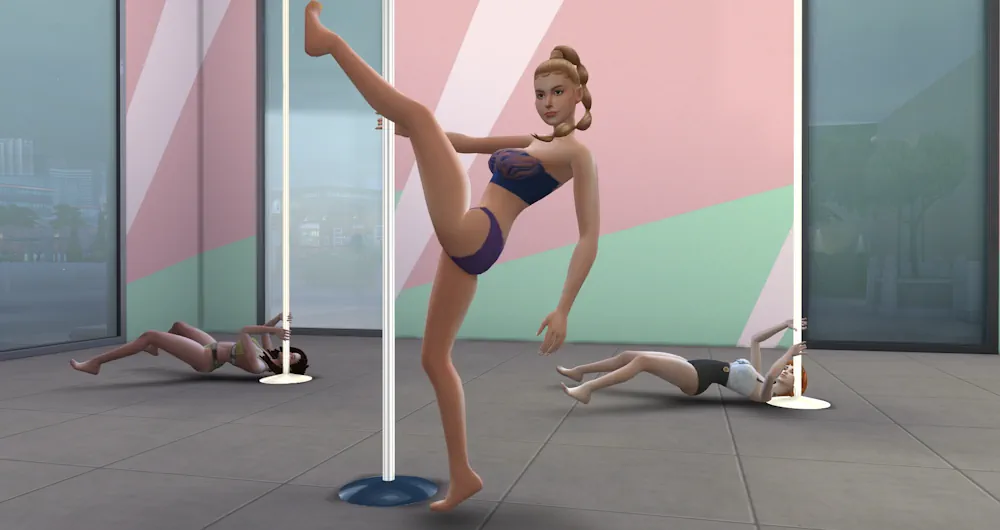


Pole Dance Mod
Some Sims just do not fit the usual treadmill-and-yoga-mat lifestyle. If you want your Sim to look more confident, artistic, and a little more dramatic, the Pole Dance Mod gives them a completely new way to move.
This mod adds a working dance pole to The Sims 4, so your Sims can practice routines, build fitness, and slowly unlock more moves as their skill improves. It works well for club builds, private studios, nightlife saves, or any Sim who needs something more expressive than basic dancing near a speaker.
A New Activity That Feels Different
The main object is a functional dance pole, not just decoration. You can place it in a bedroom, gym, bar, stage room, or custom dance studio, depending on the story you are building.
At first, your Sim starts with simpler practice. Over time, more routines become available, so it does not feel like everything is unlocked from the beginning. That makes it better for storytelling, because your Sim can actually grow from a beginner into someone who looks more confident and skilled.
The mod includes several dance routines, one performance option, and fitness gain while practicing. It is a nice detail because pole dancing in real life needs strength and control, not only style.
Good for Clubs, Performers, and Spicy Saves
This is one of those mods that can change the feeling of a build very quickly. A normal room can become a private dance studio. A basic nightclub can feel more alive. A performer Sim can finally have an activity that matches their personality better.
It is also useful if you like adult-themed storytelling without making the game feel too heavy. The mod adds more expression and movement, but still fits naturally into The Sims 4 if you use it in the right setting.
You can find the dance pole in Build/Buy mode by searching for MF or Dance Pole.
Small Details Worth Knowing
The original mod was made by Mercuryfoam. We are providing you an updated version from Mod Revivor, listed as v1.3, with fixes for recent game patches and some tuning/animation issues.
Available Files
Need help? Read our Sims 4 mod installation guide.
How to Install Sims 4 Mods & CC
- Download the file.
- Unzip the archive if needed.
- Move .package or .ts4script files to Documents/Electronic Arts/The Sims 4/Mods.
- Enable Custom Content and Script Mods in the game settings.
- Restart the game.
Comments