
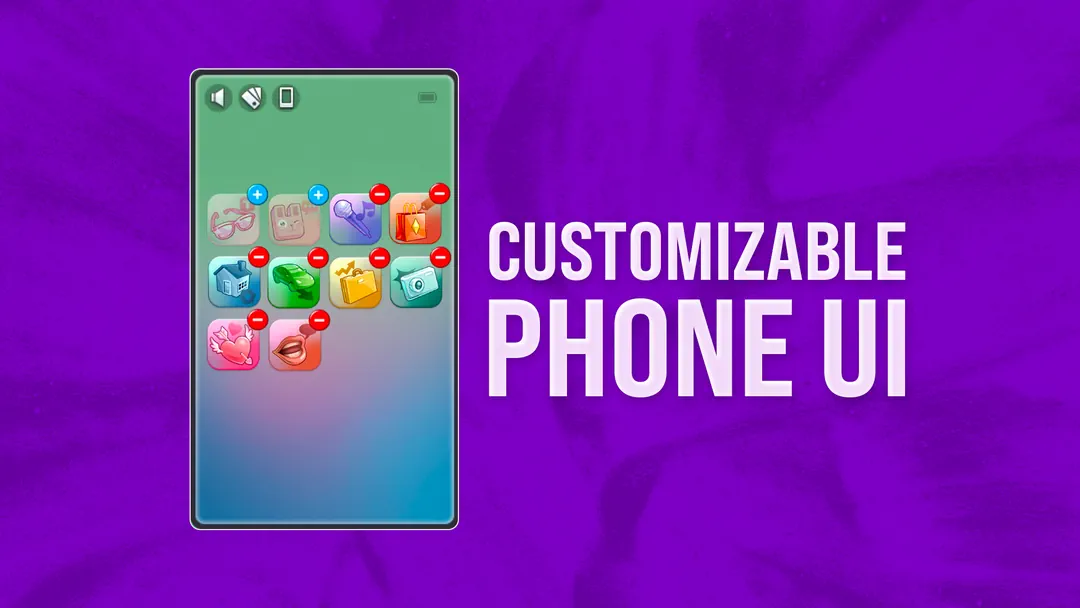


Customizable Phone UI
Customizable Phone UI is a useful mod for The Sims 4 players who want more control over the phone menu. Instead of keeping every app in the default order, you can move icons around and hide the apps you do not use often.
The mod also shows 4 apps per row, which means you can have 16 apps on one phone page. This makes the phone feel cleaner, especially if your game has many packs or extra phone features from other mods.
Organize the Phone Your Way
To edit the phone screen, click and hold an app icon until the icons start moving. After that, you can drag apps around the same page or move them to another page by dragging them to the side of the phone. When you are done, clicking any app icon will leave edit mode and save the changes.
- Move phone apps into a better order.
- Hide apps you do not use.
- Shows 4 apps per row.
- Supports 16 apps on one page.
- Works with custom phone wallpapers from the creator's generator.
One important thing to know: this mod replaces the older "Phone UI - More Apps Per Row" mod, so you should remove the old version first. It also conflicts with Phone Search by TwistedMexi, and some UI Cheats Extension icon cheats may not work while this mod is installed.
Available Files
Need help? Read our Sims 4 mod installation guide.
How to Install Sims 4 Mods & CC
- Download the file.
- Unzip the archive if needed.
- Move .package or .ts4script files to Documents/Electronic Arts/The Sims 4/Mods.
- Enable Custom Content and Script Mods in the game settings.
- Restart the game.

Comments