
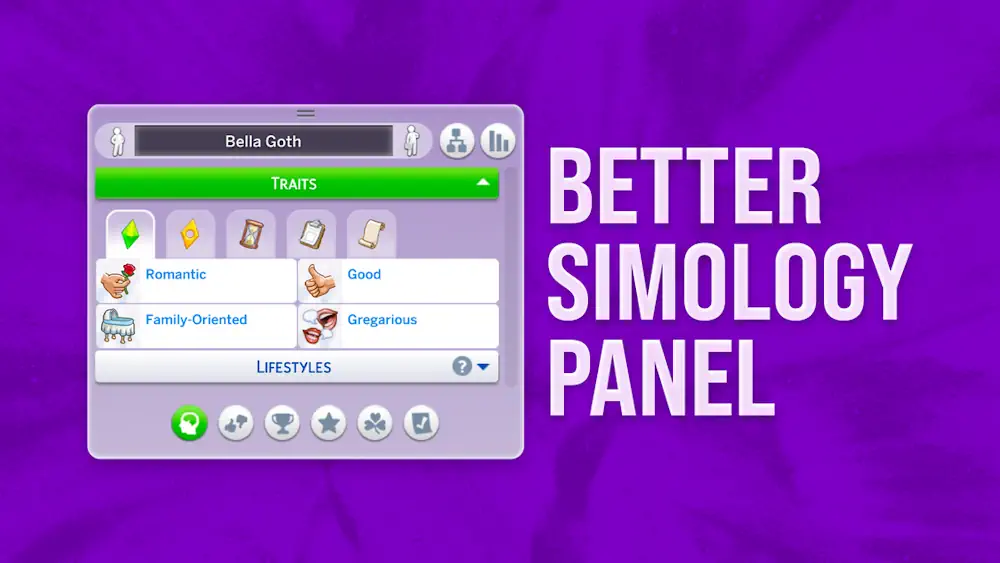


Better Simology Panel
Better Simology Panel is a UI mod for players who like cleaner menus and less scrolling. It changes the Simology panel into a more organized space, where your Sim's information is split into useful categories instead of sitting in one long list.
The new buttons help separate personality details, preferences, milestones, public reputation, inner balance, and other pack-based information. The panel only shows buttons for the packs you own, so it does not fill the screen with options you cannot use.
Less Clutter, Faster Checking
This mod is especially useful for Sims with many traits, rewards, milestones, lifestyles, or likes and dislikes. Traits can be filtered into groups like Identity, Rewards, Temporary, Status, and All. For busy legacy saves or heavily played Sims, that can make the panel much easier to read.
There are also small comfort changes. Some empty panels collapse by default, the selected category can be remembered per Sim, and the panel height can still be adjusted manually.
If you use UI Cheats Extension, install only the special UI Cheats version of this mod. If you do not use UI Cheats, pick the basic version instead. The creator also notes that this is a UI mod, so it may conflict with other mods that edit the Simology panel.
Available Files
Need help? Read our Sims 4 mod installation guide.
How to Install Sims 4 Mods & CC
- Download the file.
- Unzip the archive if needed.
- Move .package or .ts4script files to Documents/Electronic Arts/The Sims 4/Mods.
- Enable Custom Content and Script Mods in the game settings.
- Restart the game.
Comments