
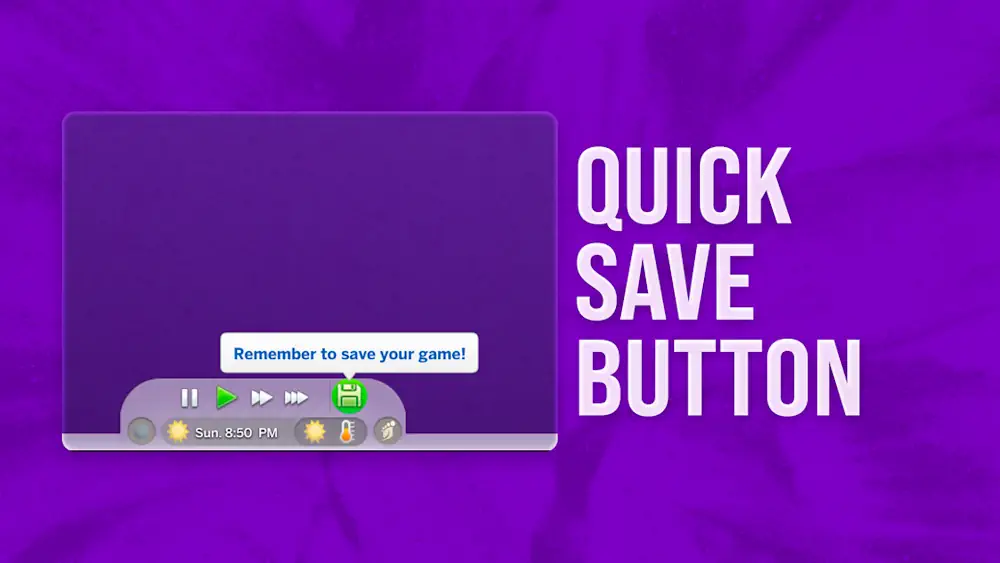


Quick Save Button
Quick Save Button is a small Live Mode UI mod that solves a simple problem: saving should not take extra clicks. With this mod, the save option sits directly on the game screen, ready whenever you need it.
It feels especially helpful during long family saves, legacy challenges, building sessions, or mod testing. One quick press can protect your progress before switching households, editing a lot, aging up Sims, or trying something risky.
Save Reminders Built Into Live Mode
The mod also includes optional save reminders. Right-click the Quick Save button and choose how often the game should remind you: 10, 20, 30, 40, 50, or 60 minutes. You can turn reminders off too, so it does not bother you if you prefer a clean screen.
Middle-clicking the button opens "Save As". That is useful when you want a backup save before testing new mods, changing a save file, or starting a new storyline without overwriting your main progress.
The download includes two versions: a regular package and a separate file for players using UI Cheats Extension. Install only the version that matches your setup. If you use the UI Cheats version, the creator recommends loading Quick Save Button before UI Cheats Extension.
Available Files
Need help? Read our Sims 4 mod installation guide.
How to Install Sims 4 Mods & CC
- Download the file.
- Unzip the archive if needed.
- Move .package or .ts4script files to Documents/Electronic Arts/The Sims 4/Mods.
- Enable Custom Content and Script Mods in the game settings.
- Restart the game.

Comments